Ads

Tuesday, June 14, 2011

Fractal eXtreme: The Barnsley Sets

In my previous post I said I would now go into all the other kinds of fractal sets Fractal eXtreme has available.  (Auto Quadratic, the "Hidden Mandelbrot", Barnsley 1, 2 and 3, Classic and Complex Newton, and Nova/NovaM).

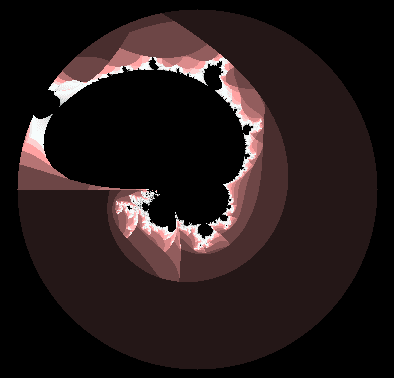
I've since played around with those various sets and believe me, some of them are mind-blowing. The thing is, I can't fit them all in, in one post. So I'll start with the less interesting Barnsleys. Actually, before I start with them, let me just cover one that really doesn't merit much attention: The Classic Newton. This is what it looks like when it loads:


Actually I think I changed the colours to make it a bit more exciting, hehe. And sure, it doesn't look so bad, you might say. But here's the thing: When you zoom in, there's only more of the same. Truly, what you see above you is all there is. I got hopeful when I noticed it had a "Duplicate as Julia" option (which you may have noticed some of the others don't have) but surprise!, no matter where you Alt-click on the original, the Julia looks exactly the same! And thus, these are the last few seconds I will spend on this "fractal". (Ok, just a few more to give it at least this small tribute: It is the first step towards the Complex Newton, a much more interesting cousin).

Ok, now for the Barnsleys! Once again, I'll start with the more boring option: Poor old Barnsley 2. Upon loading, this it what you get:


Wednesday, June 8, 2011

Fractal eXtreme: Creating different kinds of Mandelbrot Sets.

It's been a few days since my last post because honestly, after understanding the basics behind what generates a fractal, especially the Mandelbrot, the next inevitable step for me was to download as many different Fractal programs as I could and start experimenting :) ... It has been a virtual mushroom trip, to say the least.

For now though, let me stick to Fractal eXtreme. Such a nifty little program! So much more to it than one initially thinks... You've probably played around with it a bit yourself already but for the sake of being complete, I'll start at the beginning.


The first obvious thing is that you need to do is choose a Set when the program opens. It's default is the standard and much loved Mandelbrot set, but you can choose from many others.

Listed below the Mandelbrot are more Mandelbrots using different powers in their formulas. As it explains in the program, the higher the exponent, the more nodes the Mandelbrot has (always one less node than the power).

There's also an option called Mandelbrot Arbitrary Power, which is a lot of fun. You know that the normal Mandelbrot set has the function f(z)=z^2 + c behind it. Well, with the Arbitrary Set, you can set the exponent to any real number you want. The resulting fractals can be out of this world.

Then, just when you thought the Arbitrary Power was cool, along comes: The Mandelbrot Complex Power ... That's right: z^(some complex number) + c ... Instead of jading you to the adjectives 'incredible' and 'amazing', let me show you. Examples to follow of selected Mandelbrots of which I've spoken about so far.

Mandelbrot normal exponent changes :

Standard Mandelbrot Set
Mandelbrot^3 [ f(z)=z^3+c ]
Mandelbrot^8 [ f(z)=z^8 + c ]


Mandelbrot^3.5
Mandelbrot^2.5
Mandelbrot^1.7

Complex Power changes:

Mandelbrot^(8,1.73i)
Mandelbrot^(3.1,2.5i)
Mandelbrot^(2.08,0.36i)

One thing you'll notice with making changes to the exponent in these ways is that, the higher the exponent, the longer it takes for the program to render a good-looking image, especially the more you zoom in. But you don't need to zoom in very far to discover really beautiful fractals. Go ahead and try some of the different Mandelbrots, experiment with colours, etc. To change the Arbitrary and Complex powers once you've loaded the default, you need to go to Options > Plug-in Setup.

And there you have it :) Hope you're having fun :) ... Fractal eXtreme has a few other very interesting options for creating new Fractals (Auto Quadratic, the "Hidden Mandelbrot", Barnsley 1, 2 and 3, Classic and Complex Newton, and Nova/NovaM), but those I'll show you in the next post.

Saturday, June 4, 2011

Fractal eXtreme: Exploring the Mandelbrot set and Changing Colours

Ok, from here on out, I'm going to keep the maths down to a minimum :)

For the past few days, I've been playing around with Fractal eXtreme, often getting lost for hours within its beautiful depths. Now it's time to share with you all that I've learnt about it and the Mandelbrot set.

First, for all who have landed on this post first, and don't wish to go back and read all the maths explanations, here's what the Mandelbrot set looks like in Fractal eXtreme:


Really beautiful colour variations, no? And it's very easy to play around with the colours: Just go to Options > Colour Mapping, or Colour Palette.


Colour Mapping is for big, general changes. You'll see that changing the 'offset' is most effective, and adjusting the 'speed' can make things very interesting within a certain range.

Thursday, June 2, 2011

The Mandelbrot Set

The Mandelbrot Set
 Ok, on we go to the fractal design that probably led you here in the first place... The famous Mandelbrot set.

So you know now that there are as many Julia sets as there are complex numbers (an infinite amount), and each set is generated according to the results of iterating the function f(x) = x² + c ... So in other words, for each and every Julia set, there is a corresponding formula, each having a unique value of c (either a real, imaginary, or complex number).

Did you play around with Fractal eXtreme as I suggested in the previous post? Really cool, right? But I bet you felt a bit restricted in terms of which numbers generated the coolest Julia sets. You may have noticed that entering anything under -2 in the X field didn't do anything too interesting. And the same for above 1. And in the Y field, you're were even more restricted. Anything above 1.4 or so, and under -1.4, hardly produced anything worth calling a fractal. This is because, as I explained in the previous post, Julia sets are coloured according to how fast all the points on their complex plane map out or "escape" to infinity. So when your c value (real,imaginary or complex number) is too big, obviously every point mapped with our function f(x) = x² + c escapes to infinity very very quickly, and thus, the image is coloured mostly monochromatic, (blue in the case of Fractal eXtreme's default colour scheme).

Ok, to continue... Take a look at these Julia set examples:

f(z)= z² + (0.3,0.01i)
f(z)= z² + (0.18,0.7i)
f(z)= z² + (-1.36,-0.05i)

f(z)= z² + (0.3,0.25i)
f(z)= z² + (-1.3,0i)
f(z)= z² + (-0.71,-0.17i)


Wednesday, June 1, 2011

Functions and Iterations, and how fractals are generated

To start, let me show you a few images of Julia set fractals.


 Beautiful, aren't they? But how on earth do we get to these amazing images, from the very simple-seeming mathematics previously described? Well, let's continue...

Ok, so in the previous post you learnt about what complex numbers are, and how to multiply them. But knowing this isn't really the most interesting thing in the world. What is interesting is what happens when you take any complex number and feed it into some function.