Ads

Monday, June 27, 2011

Mandelbulb 3D Tutorial: Colour and Lighting cont.

Next, the Ambient tab:

I've played around with each little slide and button for half an hour and still, can't seem to come up with good explanations for all of them. I blame this on a lack of coffee. But I'll try my best and I'm sure through trying yourself, you'll get the general idea:

The "Amb" colours and slider affect the colour and intensity of the all other colours. They're like coloured lenses through which you're looking at your image, and the slide adjusts their brightness. Sliding all the way to the left essentially turns them off.

The Depth colours and slider affects the ambient background colours. The background gradients from your one chosen colour into the other.

Then you have the fog slide :) Adds spookiness to your image :) ... I remember using it in my very first 3D fractal art, back when I had no idea what I was doing. Simply adds luminescent fog of the colour of your choice around your fractal.

The fog offset decreases or increases general fogginess to the picture.
Far offset does a similar thing but starts from far back behind the fractal.

The Ambient Shadow bar is a strange one... From my observations using my forest image below, its was like I was turning a light deep within the fractal on and off, making the fractal glow or go completely dead. Again, I'm probably not quite understanding this properly yet and will add more info here once I've had more experience.

My apologies for such vague descriptions but I am truly a beginner myself. Just play around with them like I've been doing and you'll understand what they do intuitively. Here's my image after some tinkering. (Note that though I didn't (and still don't) really understand how most of the Ambient settings work, I still created this from a pre-conceived idea in my head. My forest, but foggy in the night time):
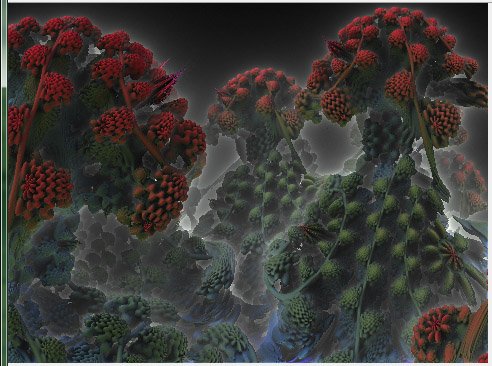
Mandelbulb Dark Forest

Mandelbulb 3D Tutorial: Lighting and Colouring

To continue...! Once again, let me state that I've only just started with Mandelbulb 3D and thus my knowledge is still in it's nascent stage. I'm doing this tutorial at this stage deliberately, so that all you guys who need it feel that I'm on more or less the same level as you: I know nothing to nearly nothing :P

Ok, on we go. To start, you need to open up your .m3i or .m3p that you saved last time (see previous tutorial page).
If opening an .m3p, remember to click on "Calculate 3D" to render your image once again.

If you remember, this is the image I am working with:


Now you need to go to the Lighting window, which should have opened up when you opened Mandelbulb 3D:


There it is. The first thing you should notice is those little Li 1, Li 2, Li 3, etc, tabs right at the top. Each one can be turned on or off with that little check-box just below "Li 1" ... Each Lighting tab can be either global or positional, and you can change the colour of the light with the little button just below the on/off check-box.

Sunday, June 26, 2011

Mandelbulb 3D Tutorial: The Basics

Alrighty! Finally decided to get down and start documenting all I've learnt so far about Mandelbulb 3D, a wonderful program for rendering 3D fractals.

Follow me on Tsu! Join up using this link: (It's invite-only, and you've just been invited =) ):
http://www.tsu.co/Mandelsage

First thing to say is, don't get intimidated by all the very technical math terms found when you open the program! You don't need to worry about most of it for now. (Though most of them, if you hover the mouse over them, will have a little description as to what they do in practical terms). Just follow my lead. So this is what the program looks like upon first opening it:


Also, two other windows open up with this one, called Formulas and Lighting, which I'll get to later.

The first thing I'm sure your eyes fixes upon is that big juicy looking button called "Calculate 3D" ... Go ahead and click on it ;D ... Here is what you should see after a quick rendering:

Saturday, June 25, 2011

The True Cave of Lost Secrets, and A Dream of Death

I asked some of the guys at Fractal forums what they thought of why my Cave of Secrets image from the previous post looked so different from the original one on Daniel White's site, and Jesse, the creator of Mandelbulb 3D himself, gave me the answer: I was using the default Mandelbulb that loads when you open the program, but the original Cave of Secrets was rendered with a slightly different variation of the formula, known to me simply as the "CosinePow8" (found under the first "3D" tab in the formulas window.)

So I rendered it up, found the Cave, and tried to make it look exactly like the original. I'm zoomed a bit closer, the colouring is really not right, and somehow the original has more detail, but here is my result:

My version of the Cave of Lost Secrets by Daniel White. Click to enlarge.

The detail is really nothing like the original and I'm wondering -why- ? ... If someone knows of a setting to increase detail, please let me know. I've tried several things to no avail. But won't give up!

Next, my second attempt at 3D fractal art, "A Dream of Death" :


What do you all think? :) I'm very proud. Comments below will be greatly appreciated. I'll get to a "Mandelbulb 3D for beginners" Tutorial soon :) ... But right now, I'm really having fun just playing around.

Mandelbulb, 3D fractal maths, and me.

For the last few days, I've been trying to understand the mathematics behind the 3D Mandelbrot, the Mandelbulb. Apparently it works in exactly the same way as the 2D Mandelbrot, except where you had the "complex plane" before, upon which all points are mapped, you now have "hypercomplex space" ...

But unfortunately, I have yet to even begin to understand how it all works. Hell, I'm not even sure about how, in 2D fractals, i=sqrt(-1) ... This simply seems impossible to me, yet it all works when the maths is applied. I have a feeling that if I truly do want to understand such things, I would need to take a few steps back, go restudy the last few years of High School maths and then continue on to University level maths. But there's no way I can do that. The idea actually entices me because I've always loved mathematics and problem solving. So when it's combined with concepts like eternity and chaos, I REALLY get interested, but for now and for the foreseeable future, I just don't have the time.

But, for anyone who cares to try on their own, here's the Mandelbulb formula from Daniel White's site (One of the original discoverers of the 3D MAndelbulb). I tried using this as a starting point to further discover how it all worked, and failed:

What's the formula of this thing?

There are a few subtle variations, which mostly end up producing the same kind of incredible detail. Listed below is one version. Similar to the original 2D Mandelbrot, the 3D formula is defined by:

z -> z^n + c

...but where 'z' and 'c' are hypercomplex ('triplex') numbers, representing Cartesian x, y, and z coordinates. The exponentiation term can be defined by: